AI as an Interface, Not a Database
This post grew into a short series on delegating real work to AI without ever handing it the keys - a pattern I’d like to call draft-only delegation. This post lays the foundation; the ones that follow push it as far as I currently trust it to go. I’ll add links here as they publish.
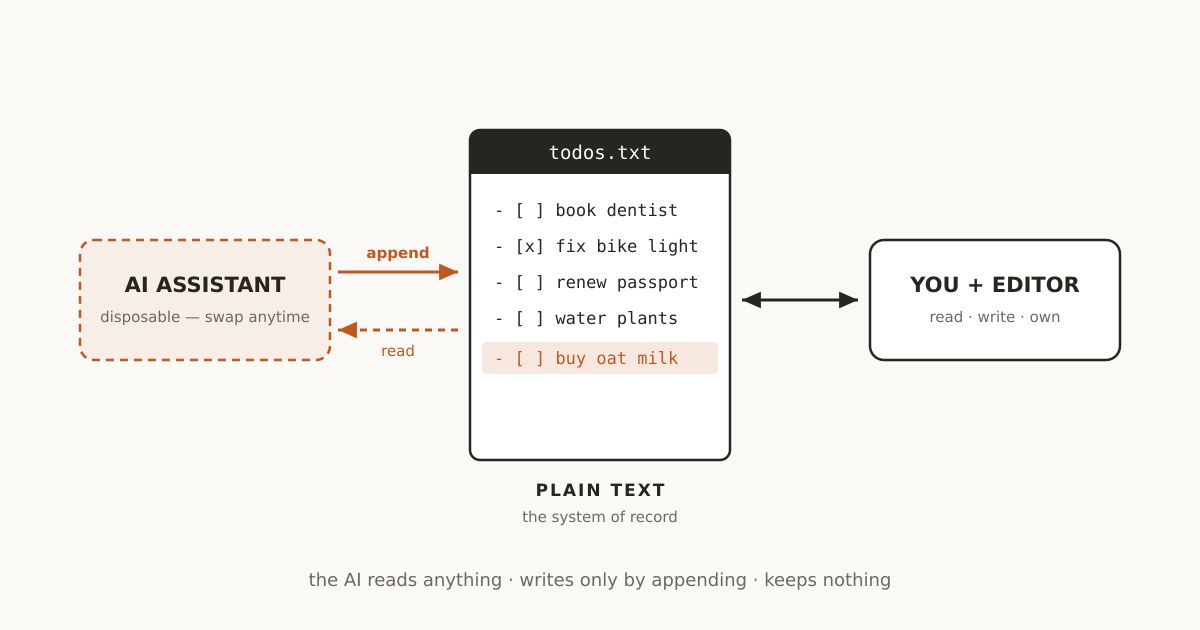
Yesterday I wrote about using OpenClaw as a mobile write path into my org-mode todos. Briefly, for anyone who missed it: OpenClaw is a self-hosted AI assistant you talk to through whatever chat app you already use. I text it something like “remind me to book the dentist”, and it turns that into a properly formatted todo entry and appends it to a plain-text file in my Dropbox - the same file my todo system has always lived in. The AI never keeps a copy; it just writes to the file and gets out of the way.
That post was about one specific setup. This one is about the pattern underneath it, because I think the pattern is more useful than the tool.
The Rule: AI Writes, It Doesn’t Own
The setup works like this: a plain-text file on disk is the database1. OpenClaw never stores a todo - it takes something I say and appends it to that file. If I deleted OpenClaw tomorrow, my todo list would be completely unaffected, because OpenClaw never held any of it.
Why plain text? That’s a case I’ve made before: plain text should be the default for anything you want to keep, and AI has been quietly winning that argument for me. This post takes the next step - once your data is plain text, what role should the AI play around it?
The answer, generalised: the AI layer is a write path, not a store of record.
None of this is a new philosophy - it’s Steph Ango’s file over app principle (“all software is ephemeral… the files you create are more important than the tools you use to create them”) extended to the AI layer. The assistant is just the newest app the files will outlive.
What the AI writes into is a system I understand. The file’s structure - what a todo looks like, how tags work, what counts as done - is mine, decided long before any AI was involved, and legible to me at a glance. The assistant conforms to my format; it doesn’t organise my life into some AI-derived scheme that I’d have to reverse-engineer before I could trust it, or even read it without the assistant’s help.
It sounds like a small distinction. It changes what you can safely delegate.
Why This Matters
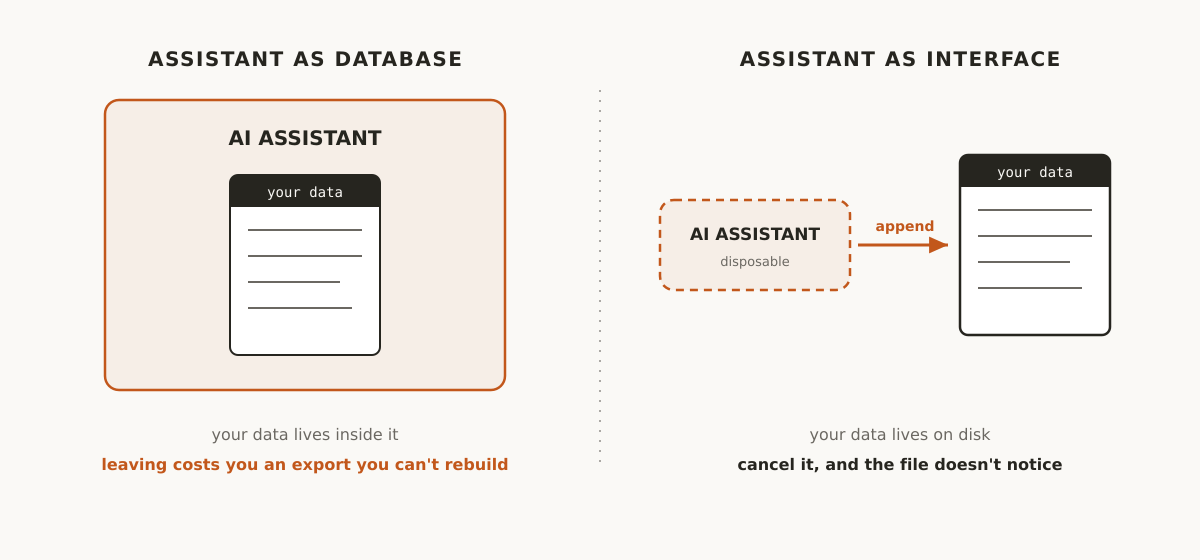
Most people’s relationship with AI assistants is the opposite of this. The assistant is the product - your data lives inside it, shaped by its schema, retrievable only through its interface. Notion AI’s understanding of your notes only exists inside Notion, for example.
Now, “cancel it and lose your data” is rarely literally true - most of these tools will hand you an export on the way out. But an export is a snapshot in someone else’s schema: a zip of HTML files, a CSV with half your fields, attachments in a folder structure nothing else understands. The data technically survives; the system you built out of it doesn’t. Lock-in was never really about a vendor destroying your data - it’s about the cost of leaving being high enough that you don’t.
When the AI is only a write path to plain text you already own, there’s no export step at all, because the data is already in its final, portable form. The assistant becomes disposable. The data doesn’t.
The Forcing Function Was Already There
LLMs are text in, text out, so workflows that want to hand off to an AI end up textual by necessity, whether or not anyone involved cares about plain text as a principle - the accidental argument-winning I mentioned above.
“AI writes, it doesn’t own” is the same forcing function, one step further in. If your system of record is already plain text because that’s what talks to AI most cleanly, the next question is where the AI’s output goes. The lazy answer is “into the assistant’s own memory or database” - which quietly recreates the exact lock-in a plain-text workflow was supposed to have escaped.
The disciplined answer is to keep pointing the write path back at the same files that got you here. You’re not fighting the tool’s grain, you’re following it all the way through.
What “Disposable” Buys You
Once the AI layer holds no state of its own, a few things fall out naturally:
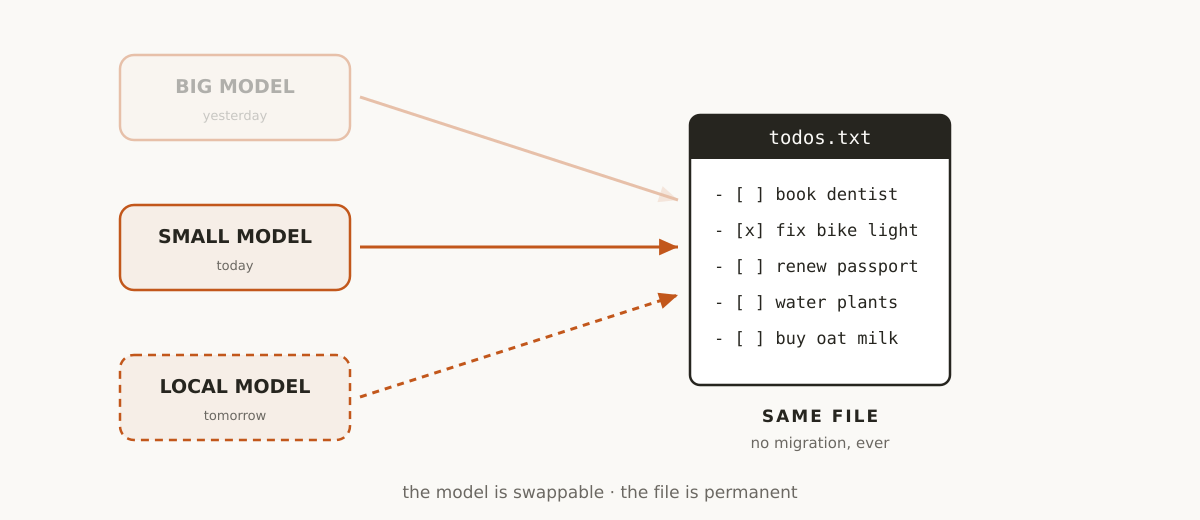
You can swap models without consequence. I started the OpenClaw experiment on Sonnet, moved to Haiku once I confirmed the parsing task didn’t need a bigger model, and I’m eyeing a local model via Ollama next. Each swap is free in the sense that matters - there’s no data migration, because there was never any data to migrate. The model is just today’s translator between “thing I said” and “line in a file.”
You can experiment cheaply. Because failure is low-stakes - a badly parsed todo is a one-line annoyance, not a corrupted database - you can try things you wouldn’t dare try on a system of record. Point a cheap or free model at the task. See if it’s good enough. If it isn’t, nothing was lost except the API call.
You don’t need to trust the AI, only audit it. I don’t need OpenClaw to be right every time. I need the file to remain readable and correct, and since it’s plain text, I can glance at it and see exactly what got appended and fix it in ten seconds. The AI’s mistakes are visible and reversible because they land in a format I already know how to read and edit by hand.
The system outlives the tool. This is the big one. Tools in this space are moving fast and many won’t exist in two years. If the durable part of your system is a plain-text file and the AI is just today’s best way of writing to it, the churn in AI tooling becomes background noise instead of an existential risk to your data.
Where the Boundary Has to Hold
This only works if you’re disciplined about the boundary. The moment an assistant starts doing anything beyond appending - reorganising your file, resolving conflicts, deciding what’s “done” - it’s stopped being a write path and started being a second source of truth, quietly competing with the first one. Two sources of truth is how you end up with sync bugs, silent overwrites, and a file you can no longer fully trust just by reading it.
So the rule I try to hold myself to: the AI appends, I (or a very boring, deterministic script) do anything more structural than that. It’s a less impressive-sounding architecture than “AI manages your todos,” but it’s the reason I’m willing to trust the output enough to actually rely on it.
Others are converging on the same discipline. Garry Tan’s GBrain pattern keeps an agent-maintained knowledge base append-only in plain markdown for exactly this reason - every change the agent makes overnight can be reviewed with a git diff. And the agent-tooling world is reaching a similar conclusion about AI memory itself: a plain text file the human can read beats an opaque store the human has to trust.
Reading, by contrast, is unrestricted. The AI can consume the files freely - answer a question about what’s on my plate, summarise the week, spot a clash between two deadlines. Reading is stateless; it creates no second copy of the truth. That asymmetry is really the whole design: the AI reads anything, writes only by appending, and keeps nothing.
Beyond Todos
None of this is specific to todos, or to any particular format. The same shape applies to notes, journaling, contact logs, reading lists - anything where the durable format is plain text you already control. Email is the other place I’ve applied it: my inbox is synced to plain-text files on disk2, and any AI that touches it is, at most, a triage layer suggesting what to do - never the thing holding the mail.
The specific tools will keep changing. OpenClaw might not exist in its current form a year from now, and I’ll have moved on to whatever replaces it. The files will still be there, readable by whatever comes next, because they never depended on any of it in the first place.
Footnotes
-
In my case that’s Emacs and org-mode -
.orgfiles synced over Dropbox. The pattern doesn’t care what reads the file; any plain-text format and any editor would do just as well. ↩ -
Via mu4e in Emacs - see Setting Up Email in Emacs for the setup. ↩
Comments
Loading comments…